Street context up front.
Large street text and nearby cross-street context, when available. A nearby address is context for a GPS reading, rather than proof of an exact building.
 StreetCue
Coming soon
StreetCue
Coming soon
iPhone + Apple Watch
The street. The cross street. The direction.
Bring the details that matter into focus.
Built for law enforcement, first responders, field professionals—and anyone who needs to know where they are.
Clarity in the field
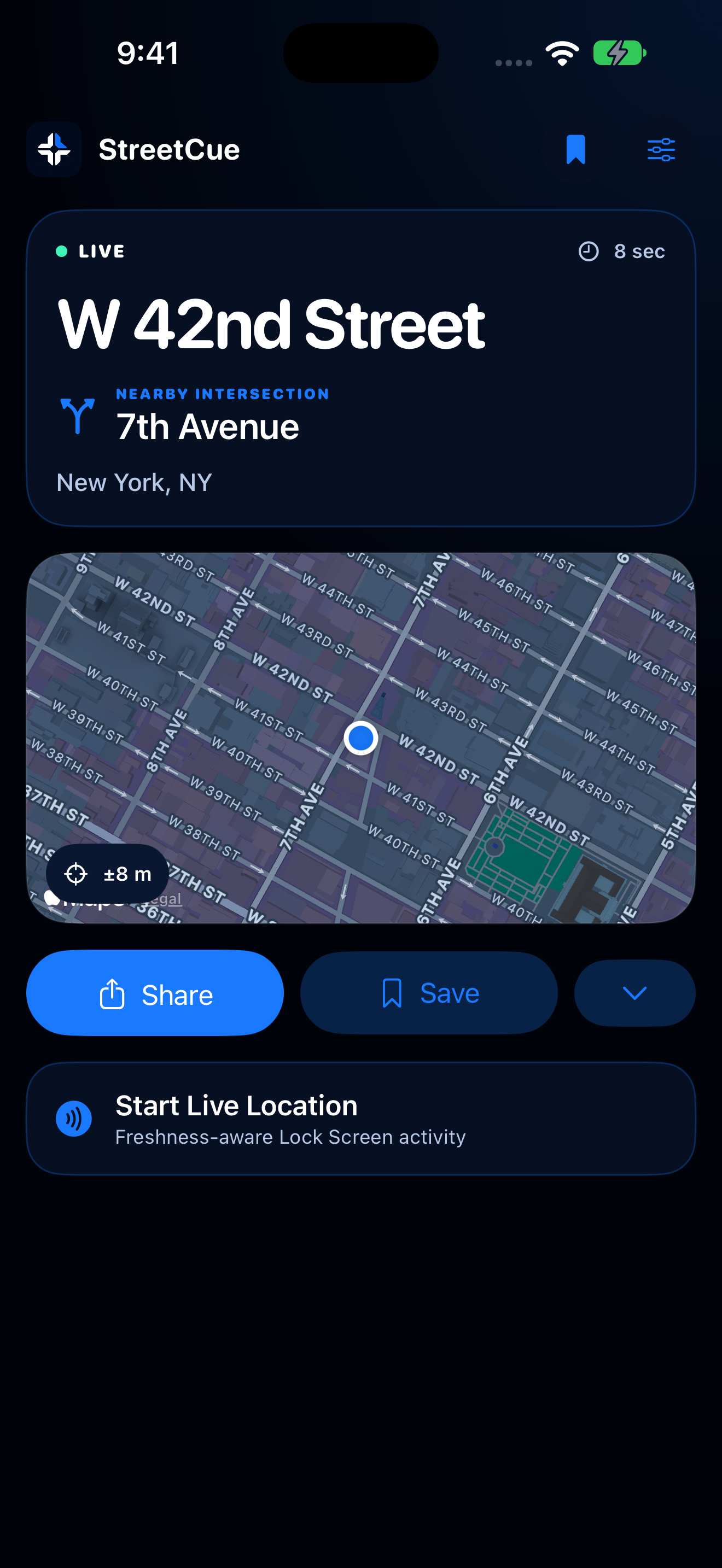
A focused screen for the moment you need to read, save, or communicate your location.
Large street text and nearby cross-street context, when available. A nearby address is context for a GPS reading, rather than proof of an exact building.
Send coordinates, available street context, timestamp, reported accuracy, and an Apple Maps link through your preferred app.
Save a location on your device. Revisit it later and hand it off to Maps when you need navigation.
Two directions. Two useful answers.
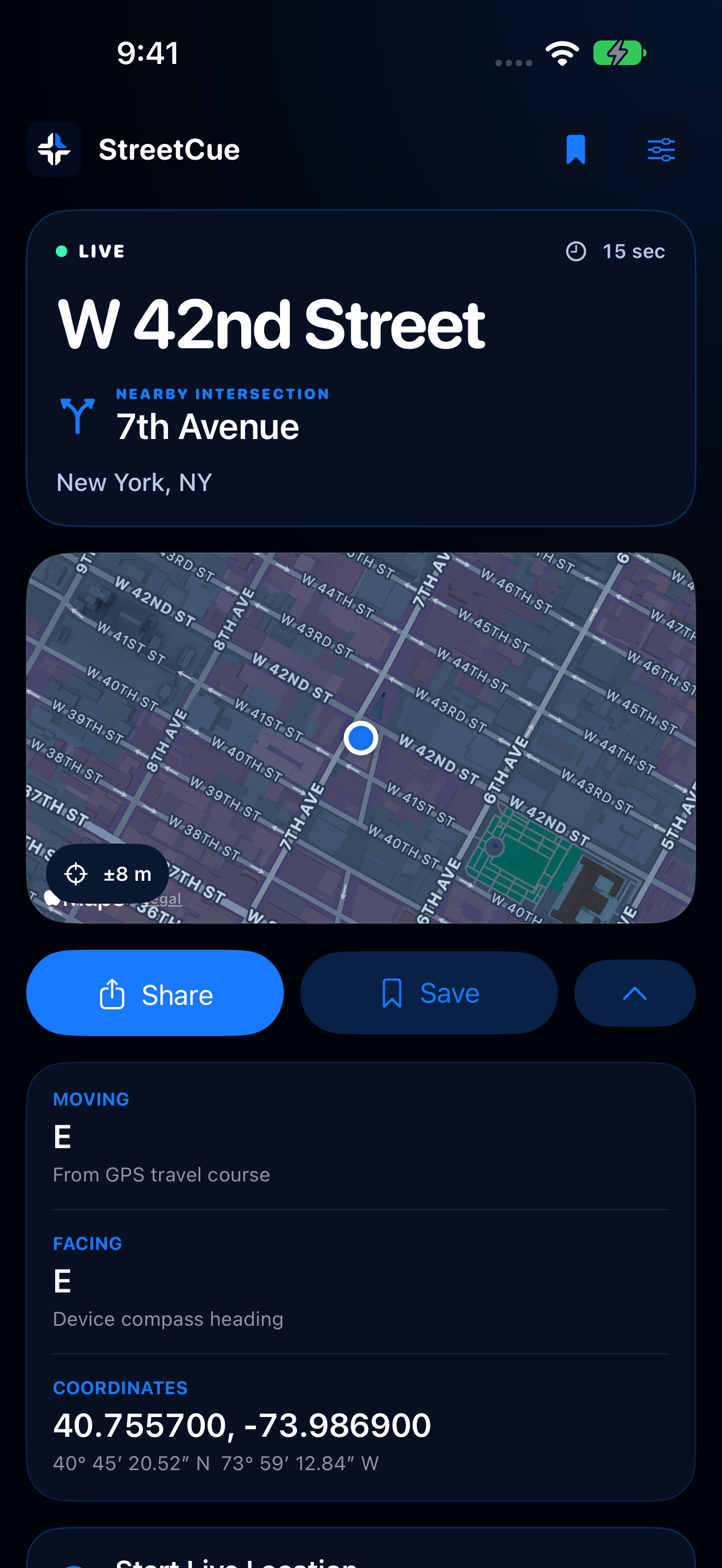
Travel direction comes from your movement. Compass heading comes from how you hold your device. StreetCue labels them separately so you can read the right one.
GPS travel course
Device compass heading
Direction and accuracy depend on device sensors and conditions. A stationary device may have no reliable travel course.
Designed for Apple Watch
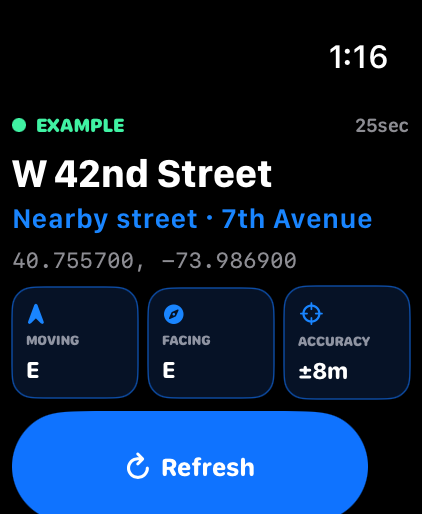
A native Watch experience with readable street context, coordinates, direction, and a refresh action. Request a Watch reading, or see a clearly labeled phone snapshot when one is available.
Captured from the native Watch simulator build. Physical-device connectivity and battery testing remain in progress.
Know what the reading means
Reported accuracy tells you how uncertain a position may be. Reading age tells you when it was measured. Both matter when you’re communicating a location.
GPS and street lookup are different sources. Tall buildings, tunnels, connectivity, and sensor conditions can affect the result.
A radius around the reading, not a guarantee of an exact point.
The timestamp belongs to the reading. A new GPS fix doesn’t make an older street lookup new.
Nearby context can be incomplete or unavailable. Cross-street behavior is undergoing field validation.
Simple plans
Planned U.S. launch pricing. Purchases will use Apple’s localized prices when StreetCue becomes available.
Core location information and manual sharing.
Or $3.99 monthly. Annual billing works out to about $2.08 per month.
Your location belongs to you
No account for basic use. Personal pins stored on your device. No sale of location data or location advertising.
Read our privacy policyA few things to know
StreetCue is in development and testing. The app is not yet available on the App Store. We’ll add a download link here when availability is confirmed.
Live team rooms are not available in the current build. Manual sharing sends a location snapshot; it does not continuously share your position. Temporary team sessions are being evaluated for a future release.
No. A GPS reading and a nearby address are different pieces of information. Buildings, satellite visibility, and map data can affect the result. Always check the reported accuracy and context.
Device coordinates and compass readings may remain available when hardware and permissions allow. Saved pins stay on the device. Street lookup generally needs connectivity, and offline downloadable maps are not included.
No. Apple controls widget refresh and app background activity. Widgets show snapshots. A Live Activity receives updates from the app and does not have its own GPS. Locked-screen and background behavior are still being tested before release.
Active GPS and compass use consume power. We’re measuring realistic iPhone and Watch sessions before publishing battery estimates. Device, signal conditions, and session length all affect usage.
StreetCue is a personal location utility. It does not connect to dispatch or CAD and is not affiliated with any department or government agency. It does not replace emergency services or your organization’s procedures.
Coming to iPhone + Apple Watch
We’re refining StreetCue and validating it in the conditions that matter. Available after testing and App Store review.
Contact StreetCue